

1. Onet Connect Classic Game Overview
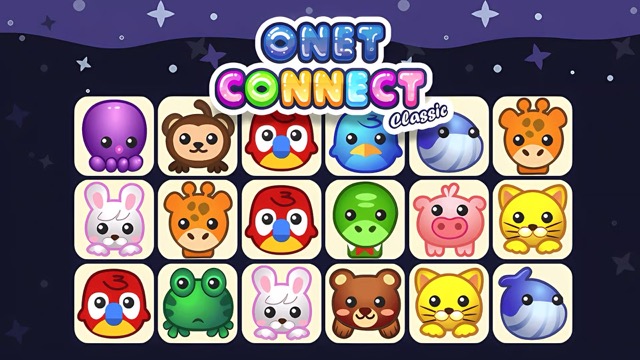
Onet Connect Classic is a tile-connecting puzzle game where the challenge is finding matching items and proving that they can be linked — not just visually identified. Set across three themed worlds (Animals, Food, and Fruits), it offers thousands of levels that range from relaxing early-stage pattern matching to frantic high-level challenges where the board itself starts moving.
The core mechanic is clean and immediately understandable: select two identical tiles and they clear from the board — but only if the connection path between them uses three straight lines or fewer. This path rule is what separates Onet Connect Classic from simple visual search games. Two obviously matching tiles might be impossible to connect yet, because the routing between them is blocked by surrounding tiles. Clearing other tiles first to open a valid path is the puzzle's strategic layer.
The three thematic modes offer more than cosmetic variety. Animals, Food, and Fruits each feature distinct tile sets with different identification challenges — some images are immediately distinct, others require closer attention to differentiate similar-looking items. Each mode also has its own level progression, meaning three separate content libraries of hundreds of levels each.
The movement mechanic introduced at higher levels transforms the game from a static spatial puzzle into a dynamic one: tiles shift position after each of your moves, changing the available connection paths in real time. This single addition dramatically increases the cognitive demand and keeps even experienced players engaged well into the level progression.
Key Details:
| Genre: | Puzzle / Tile Matching / Connection |
| Difficulty Level: | Easy to Hard (escalates within and across level tiers) |
| Average Play Time: | 5–10 minutes per level |
| Best For: | Casual puzzle fans who enjoy image-matching with a spatial routing challenge; great for players who want extensive content with progressive difficulty |
2. How to Play Onet Connect Classic
Getting Started:
- Choose a mode: Animals, Food, or Fruits.
- The board displays tiles filled with themed images.
- Click the first tile of a matching pair to select it.
- Click the second matching tile — if they can be connected by three straight lines or fewer, both tiles are removed.
- Clear all tiles from the board to complete the level.
Basic Controls:
- Mouse Click (Select): Click a tile to select it as the first of a matching pair.
- Mouse Click (Connect): Click the matching tile to connect and clear the pair if a valid path exists.
Objective: Clear all tiles from the board by connecting every matching pair via a path of three straight lines or fewer. Progress through hundreds of levels in each of the three themed modes.
3. Onet Connect Classic Features & Highlights
- ✓ Three themed modes — Animals, Food, and Fruits each with distinct tile sets and individual level progressions
- ✓ Thousands of levels — enormous content depth across all three modes
- ✓ Three-line connection rule — a routing constraint that adds genuine spatial planning depth beyond visual matching
- ✓ Moving board mechanic — in higher levels, tiles shift after each move, making the routing challenge dynamic
- ✓ Progressive difficulty — manageable early levels that steadily build toward genuinely demanding higher stages
4. Onet Connect Classic Tips & Strategies
Beginner Tips:
- Check the connection path, not just the matching image. Two identical tiles can't be connected if the routing between them requires more than three straight lines. Confirm a valid path exists before clicking — an invalid connection attempt wastes time without clearing anything.
- Clear perimeter tiles first. Tiles on the edges of the board have the most open routing space around them. Clearing edge pairs first opens connection paths for the more centrally located pairs that are currently blocked.
- Look for pairs that unblock multiple others. Some tile pairs, when cleared, open the path for two or three additional pairs that were previously blocked. Prioritize these high-value removals for cascading clearing efficiency.
Advanced Strategies:
- In moving-board levels, plan for the shift. When tiles move after each of your matches, the connection paths change. Before clicking, think about where the tiles will be after the movement and whether the pair you're about to clear will still have accessible matches for the ones you plan to clear next.
- Identify "bottleneck" tiles early. On complex boards, certain tiles block routing for a disproportionate number of pairs behind them. Identifying and clearing these bottleneck tiles quickly opens the most connection routes for subsequent matches.
- Develop mode-specific image recognition. Each themed mode has tile images that require different levels of attention to differentiate — some animals look similar; some food items are harder to distinguish at small sizes. Investing time in recognizing each mode's specific tile set pays dividends in matching speed at higher levels.
What to Watch Out For:
- Routing deadlocks. Clearing tiles in the wrong order can leave pairs with no valid three-line connection path — because the tiles that would have served as routing space were cleared too early. Always think about the routing consequences of each removal, not just the match value.
- The movement trap in higher levels. In moving-board levels, a connection that looks clear before your click may no longer be valid by the time the match resolves if movement has already begun. Stay alert to board shifts and recalculate after every move.
5. Onet Connect Classic Game Elements Explained
The Three-Line Connection System: Onet Connect Classic's defining mechanical rule is the three-line connection constraint. Two matching tiles can only be cleared if a path of three or fewer straight-line segments can be drawn between them through open (tile-free) space. A single-segment path (tiles directly adjacent in a clear line) is a one-line connection. A path that turns once is a two-line connection. A path that turns twice is a three-line connection. Any path requiring four or more turns is invalid, regardless of how close the tiles appear. This constraint transforms the game from a pure visual search exercise into a spatial routing puzzle: finding a match is only half the challenge, and confirming that a valid routing path exists between the matched tiles is the other half. As the board fills and tiles block routes from multiple directions, routing becomes progressively more complex.
The Three Themed Mode System: Animals, Food, and Fruits are not just aesthetic skins over identical gameplay. Each mode features a distinct tile image library that creates different identification challenges: differentiating between a cat and a rabbit might be instantly easy, while telling apart two similar-colored vegetables requires closer attention. The modes also have separate level progressions, meaning each mode can be played through hundreds of levels independently with its own escalating difficulty curve. Players who prefer one theme can concentrate entirely on it; players who want variety can rotate between modes. The three separate content libraries also mean Onet Connect Classic offers three times the level content of a single-mode game — an enormous amount of puzzle material for a tile-matching game.
The Moving Board Mechanic: At higher levels within each mode, Onet Connect Classic introduces a board that moves after each player action — tiles shift position following every match you make. This single addition fundamentally changes the cognitive demand of the game. In a static board, you can plan multiple moves ahead and execute them in sequence with confidence. In a moving board, each match invalidates your pre-planned routing because the tile positions have changed. Players must re-evaluate the board after every move rather than executing a planned sequence, which requires both faster pattern recognition and greater adaptability. The moving board mechanic is introduced gradually in higher levels, ensuring players have developed basic routing intuition before the dynamic challenge begins.
6. Onet Connect Classic Frequently Asked Questions
Q: What makes a connection between two tiles valid?
A: A connection is valid when a path of three or fewer straight-line segments can be drawn between the two matching tiles through open, tile-free space. Paths requiring four or more straight segments are invalid, even if the tiles match.
Q: Why can't I connect two tiles that clearly show the same image?
A: The images matching is necessary but not sufficient — a valid three-line-or-fewer routing path must also exist. If surrounding tiles block every possible path, the connection isn't available yet. Clear other tiles first to open a routing path.
Q: What is the movement mechanic in higher levels?
A: In advanced levels, the board's tiles shift position after each match you make. This means routing paths change after every move, requiring you to re-evaluate the board dynamically rather than following a pre-planned sequence.
Q: How are the three modes different from each other?
A: Each mode (Animals, Food, Fruits) features a distinct set of tile images and its own independent level progression with hundreds of levels. The thematic tile sets create different visual identification challenges. You can play each mode independently and progress through its full level roster separately.
Q: Is Onet Connect Classic playable on mobile?
A: Yes — the click-to-connect mechanics translate to tap controls, and the game runs in mobile browsers without requiring a download. The three-themed tile sets are visually clear on phone and tablet screens.