




1. Freecell Solitaire Game Overview
FreeCell Solitaire is the solitaire variant that changed everything. Unlike standard Klondike — where a bad deal can make the game unwinnable no matter how skillfully you play — nearly every FreeCell deal is solvable with the right strategy. The game doesn't punish you with bad luck; it rewards you with good thinking. That fundamental fairness is what makes FreeCell one of the most beloved and respected solitaire variants in the world.
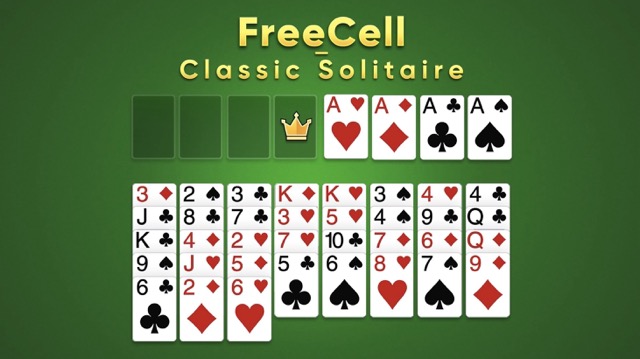
The key innovation is the four free cells — open storage spaces in the upper-left corner of the board where any single card can be temporarily parked. These cells transform the game entirely. In Klondike, a card buried under others is simply inaccessible. In FreeCell, you can systematically reorganize the tableau by using the free cells as a flexible buffer, moving blocking cards aside to expose what's beneath. The solution to almost every FreeCell deal exists — finding it is the puzzle.
This version adds a set of helpful tools that make the game more accessible without reducing its intellectual challenge. A light bulb hint button surfaces useful moves when you're stuck. A shuffle button reorganizes a stuck tableau stack. An undo button lets you reverse your last move and try something different. And a power-up lets you pull any specific card to the front of a stack when you need it immediately. These tools are support, not shortcuts — they help you learn and recover, while the core strategic satisfaction of finding the solution remains fully yours.
FreeCell Solitaire is a deeply satisfying solo card game that rewards patience, planning, and systematic thinking every single time you play.
Key Details:
| Genre: | Card Game / Solitaire / Puzzle |
| Difficulty Level: | Medium to Hard |
| Average Play Time: | 10–25 minutes per game |
| Best For: | Solitaire enthusiasts and strategic thinkers who enjoy methodical planning and near-guaranteed solvable puzzles |
2. How to Play Freecell Solitaire
Getting Started:
- All 52 cards are dealt face-up across eight tableau columns — all cards are visible from the start.
- In the upper left, four free cells provide temporary parking spaces for individual cards.
- In the upper right, four foundation piles await — one per suit, building from Ace to King.
- Move tableau cards onto other tableau cards of the opposite color that are one rank higher.
- Use the free cells to temporarily store blocking cards while you reorganize the tableau toward foundation-ready sequences.
Basic Controls:
- Click (PC): Left-click to pick up a card; click the destination to place it.
- Touch (Mobile): Tap a card to select it, then tap the destination to move it.
- Hint Button (💡): Press the light bulb to reveal a suggested valid move.
- Shuffle Button: Reorganizes a stuck stack for fresh possibilities.
- Undo Button: Reverses your most recent move.
- Power-Up: Pulls any specified card to the front of its stack.
Objective: Move all 52 cards to the four foundation piles — one per suit, each built from Ace up through King — by systematically using the four free cells and tableau movements to organize and expose the right cards in the right order.
3. Freecell Solitaire Features & Highlights
- ✓ Nearly every deal is solvable — FreeCell's design ensures strategic skill, not luck, determines outcomes
- ✓ All cards visible from the start — full information from deal means every move is a deliberate, informed decision
- ✓ Four free cells — the defining mechanic that enables flexible card management and systematic tableau reorganization
- ✓ Hint, shuffle, and undo tools — support features for learning and recovery without removing strategic ownership
- ✓ Power-up card access — bring any card to the front of its stack when a specific card is critically needed
4. Freecell Solitaire Tips & Strategies
Beginner Tips:
- Move Aces and Twos to foundations immediately. These are always valid foundation moves — there's never a reason to leave an Ace or Two in the tableau when its foundation pile is ready for it.
- Don't fill all four free cells at once. Each occupied free cell is one fewer degree of freedom for your next move. Keep at least one or two cells empty so you always have somewhere to park a blocking card when you need to access what's beneath it.
- Plan your free cell use two moves ahead. Before moving a card to a free cell, know what you're going to do with it next — which tableau pile it will go to or which foundation it's heading for. Parking a card with no plan wastes a cell.
Advanced Strategies:
- Read the full tableau before your first move. FreeCell deals are fully visible from the start. Take 30 seconds to scan the entire layout, identify your Aces, locate potential tableau sequences, and map a rough plan before placing any card.
- Build in-suit tableau sequences where possible. Moving tableau cards in same-suit sequences (rather than alternating color) keeps related cards together and often makes them easier to move as a unit, extending your effective working range within the tableau.
- Use undo liberally as a planning tool. The undo button isn't just for mistakes — it's a legitimate planning mechanism. Make a move, see its consequences, and undo if the result reveals a problem you hadn't anticipated. Iterative move testing is a valid strategy.
What to Watch Out For:
- Stranding a card in a free cell too long. A card parked in a free cell that has nowhere to go becomes a permanent obstruction, reducing your available cells for everything else. Always have an exit plan for any card before you park it.
- Blocking your own foundations. Placing a high-ranking card in the tableau where it blocks lower-ranking cards of the same suit you need for the foundation is a common mid-game trap. Track which cards are beneath which, especially for cards of suits you're actively building on the foundations.
5. Freecell Solitaire Game Elements Explained
The Free Cell System: FreeCell's four free cells are the mechanic that defines the game's identity. Any single card from a tableau pile can be moved to an empty free cell at any time, where it sits accessible but out of the main tableau flow. Cards in free cells can be moved to valid tableau positions or directly to their foundation pile when eligible. The cells function as a flexible workspace — a place to set aside a blocking card temporarily while you access what's beneath it, then retrieve it when you're ready. The critical constraint is that only one card fits in each cell, and four cells means you have a maximum of four simultaneous "set aside" operations available. Managing these four slots — keeping them as clear as possible while using them strategically — is the central tactical skill of FreeCell.
The Full-Information Tableau: Unlike most solitaire variants where some cards are face-down and unknown, FreeCell deals all 52 cards face-up from the very first move. This full-information design is what makes FreeCell a pure strategy puzzle rather than a luck-modified strategy game. You can see every card at every moment, which means every decision is made with complete knowledge of the board state. This sounds like it would make the game easier — and in one sense it does, eliminating the frustration of a hidden card ruining your plan. But it also makes every mistake entirely attributable to planning rather than luck, which raises the quality of strategic engagement. The best FreeCell players develop the habit of reading the full deal at the start of each game and forming a rough solution plan before making a single move.
The Hint and Support Tool System: FreeCell's hint button (light bulb), shuffle button, undo function, and power-up card access are designed to make the game educational and recoverable without removing strategic ownership. The hint button suggests one valid next move — useful for learning patterns but not a full solution path. The shuffle button offers a fresh arrangement of a stuck pile — a way to escape gridlock without starting over entirely. The undo button reverses the last move, enabling the iterative move-testing approach that skilled FreeCell players use as a legitimate planning technique. The power-up brings a specific card to the front of any stack — invaluable when a critical card is buried and conventional cell-and-tableau maneuvering would take too many moves to expose it. Together, these tools make FreeCell accessible to developing players without reducing the satisfaction experienced players feel from solving deals through pure strategic execution.
6. Freecell Solitaire Frequently Asked Questions
Q: How do I move a card to a free cell?
A: Click (or tap on mobile) the card you want to move, then click an empty free cell to place it there. The card stays in the free cell until you move it to a valid tableau position or its eligible foundation pile.
Q: Can I move more than one card at a time?
A: Standard FreeCell rules allow only one card to be moved per action. However, if you have empty free cells and empty tableau columns available, you can effectively move sequences of cards through multiple individual moves. Some versions allow multi-card moves as a shortcut.
Q: What does the power-up do?
A: The power-up lets you select any card and bring it to the top (front) of its current stack, bypassing the cards above it. Use it when a specific card is critically needed and conventional move sequences to expose it would take too many steps.
Q: Is it possible to get a deal that can't be solved?
A: Virtually no — FreeCell is notable in the solitaire world for having an extremely high percentage of solvable deals (estimated at over 99.999%). If you feel stuck, use the hint button or try undoing several moves and approaching from a different direction.
Q: When should I use the shuffle button?
A: Use the shuffle button when a specific tableau stack has become completely blocked — no valid move exists to or from it through normal cell and tableau maneuvers. The shuffle reorganizes the stack and may open new movement possibilities you didn't have before.