



1. Lightning Cards Game Overview
Lightning Cards is a fast, reactive card game that pits you against a computer opponent in a real-time race to empty your hand onto four shared discard piles. Speed matters, but so does reading the board — pile directions change, special cards alter the rules mid-game, and the moment you hesitate, the computer is already placing its next card.
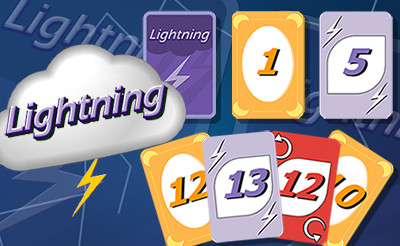
The core dynamic is immediately engaging: both you and your opponent hold 24 cards, and you're both playing to the same four central piles simultaneously. The direction arrow beneath each pile tells you whether the next card must be one value higher or one lower. Get the right card to the right pile faster than your opponent, and you're winning. But the competitive tension isn't just about hand speed — it's about board awareness. Arrows flip. Wild cards appear. Lightning cards cascade into bonus points. The Flip It card reshuffles everything when neither player can move.
The special card system adds genuine strategic texture beneath the speed challenge. Wind Cards create flexible "play on anything" slots. Red circular-arrow cards reverse a pile's direction, potentially ruining your opponent's planned sequence while opening your own. Lightning Cards reward stacking — place one on another for a score bonus that compounds with every consecutive Lightning hit.
The wrapping rule (13 leads back to 1, and vice versa) means no position is ever truly hopeless. A stuck pile can become viable again the moment it wraps, which keeps every hand competitive until the final card.
Key Details:
| Genre: | Card Game / Speed / Competitive |
| Difficulty Level: | Medium |
| Average Play Time: | 5–15 minutes per match |
| Best For: | Players who enjoy fast-paced competitive card games with real-time decision-making and special card mechanics |
2. How to Play Lightning Cards
Getting Started:
- Both you and the computer start with 24 cards in your respective reserve piles.
- Cards from your reserve appear one at a time — place them on one of the four central discard piles.
- Check the arrow under each pile: upward means the next card must be one value higher; downward means one value lower.
- Place all 24 of your cards before the computer does to win.
- If neither player can place a card, the Flip It card appears — reshuffling pile numbers, card types, and arrow directions.
Basic Controls:
- Mouse Click / Drag: Select a card from your hand and click or drag it to a valid discard pile.
Objective: Empty your 24-card reserve pile onto the four central discard piles before the computer empties its own. Use special cards strategically and react faster than your opponent to each new board state.
Key Rules:
- Values wrap: a pile at 13 accepts a 1 next (and vice versa)
- Wind Cards: can be placed on any pile; any card can be placed on a Wind Card
- Red Circular-Arrow Cards: reverse the direction of a pile's arrow
- Lightning Cards: earn bonus points when stacked on other Lightning Cards
3. Lightning Cards Features & Highlights
- ✓ Real-time head-to-head competition — you and the AI place cards simultaneously, creating genuine speed-based tension
- ✓ Four-pile shared board — both players compete for the same discard piles, creating contested placement decisions
- ✓ Three special card types — Wind, Reverse, and Lightning cards each add a distinct strategic layer
- ✓ Flip It card mechanic — a board-resetting card that appears when play stalls, ensuring matches never dead-end
- ✓ Value wrapping rule — 13-to-1 and 1-to-13 continuations mean no pile is ever permanently closed
4. Lightning Cards Tips & Strategies
Beginner Tips:
- Scan all four piles before placing. Multiple piles may accept your current card. The best placement is the one that opens the most future options, not just the first valid spot you see.
- Use Wind Cards to unblock yourself, not just for convenience. A Wind Card placed when you have plenty of valid plays is wasted flexibility. Save them for moments when your only other option is waiting.
- Watch the arrow directions constantly. The board state changes with every card placed — by you and the computer. A pile pointing up two seconds ago may now be pointing down. Check before placing.
Advanced Strategies:
- Use Red Reverse Cards offensively. Flipping a pile's arrow direction when the computer is clearly set up to play into it disrupts their planned sequence and may force them into a stall. The best reverse plays serve your positioning and hurt theirs simultaneously.
- Prioritize Lightning Card stacking. Lightning bonuses compound — each Lightning placed on another Lightning scores incrementally more. When you see a Lightning Card on a pile and hold a Lightning Card in hand, treat it as a priority play over other valid placements.
- Track the computer's hand indirectly. You can't see your opponent's cards, but you can observe what piles they favor and what directions they play into. This gives you a rough model of their hand state — useful for deciding when to play aggressively and when to hold a card for a future window.
What to Watch Out For:
- Ignoring wrapping opportunities. When a pile reaches 13 and you hold a 1, that's a valid play — and new players frequently miss it. The same applies in reverse. Always include wrap-around values when evaluating which cards in your hand are currently playable.
- Letting the computer trigger Flip It advantageously. The Flip It card reshuffles the board entirely. If the current state strongly favors your hand, delaying to prevent a stall may be worth forgoing a play. If the current board strongly favors the computer, triggering a Flip It is sometimes worth it.
5. Lightning Cards Game Elements Explained
The Real-Time Competitive Placement System: Lightning Cards' defining mechanic is that both players place cards simultaneously — there are no turns. While you're evaluating a placement, the computer is also placing, and the pile you were planning to play into may already have its top card changed by the time you act. This simultaneity creates genuine competitive tension: the gap between seeing a valid play and executing it is real, and faster, more decisive play consistently outperforms slower, more deliberate analysis at this game's speed level. The board is always in motion, which means card evaluation must happen in seconds rather than at leisure.
The Special Card System: Three special card types layer meaningful decisions onto the speed-matching core. Wind Cards act as universal wildcards — they can be placed on any pile regardless of its current value or direction, and any card can subsequently be placed on top of them, effectively resetting a pile's connection requirement at the point of placement. Red circular-arrow cards reverse the direction of whichever pile they're placed on — flipping an ascending pile to descending and vice versa. Lightning Cards score bonus points when placed on top of other Lightning Cards, with the bonus compounding for each consecutive Lightning in the stack. Managing when to deploy each special card type — and watching for the computer doing the same to piles you were targeting — is the strategic layer that runs beneath the speed game.
The Flip It and Wrapping Systems: Two mechanics prevent Lightning Cards from ever reaching a completely deadlocked state. The wrapping rule allows values to cycle continuously: a pile at 13 accepts a 1 as the next card (continuing in the same direction past the deck's maximum), and a pile at 1 accepts a 13 (wrapping in the other direction). This ensures that apparently stuck piles always have a theoretical next valid card. The Flip It card appears when neither player can place any card — it instantly reshuffles all four piles' current values, card types, and arrow directions simultaneously, creating a new board state from the stalled one. Together, these two systems ensure matches always progress toward a conclusion rather than grinding to a halt.
6. Lightning Cards Frequently Asked Questions
Q: How do I know which cards I can play?
A: Check the arrow under each of the four discard piles. An upward arrow means the next card placed must be one value higher than the current top card; a downward arrow means one value lower. Wind Cards can always be placed on any pile. Check for wrapping — a pile showing 13 with an upward arrow accepts a 1, and a pile showing 1 with a downward arrow accepts a 13.
Q: What does the Wind Card do?
A: A Wind Card can be placed on any pile regardless of direction or current value, and any card can be placed on top of a Wind Card on the next play. It effectively creates a neutral placement that breaks any blocking sequence.
Q: How do Lightning Cards score bonus points?
A: When you place a Lightning Card on top of another Lightning Card already on a pile, you earn a bonus score. The more Lightning Cards stacked consecutively, the higher the bonus for each addition.
Q: What triggers the Flip It card?
A: Flip It appears when neither you nor the computer can legally place any card on any of the four discard piles. It immediately reshuffles all four piles' values, card types, and arrow directions to create a new playable board state.
Q: What happens when a pile reaches 13 or 1?
A: The value wraps around — a pile at 13 with an upward arrow accepts a 1 as the next card, and a pile at 1 with a downward arrow accepts a 13. This means piles never reach an absolute end value; they cycle continuously.