


1. Original Classic Solitaire Game Overview
Original Classic Solitaire brings the world's most familiar card game to mobile devices with a thoughtful combination of traditional gameplay and modern quality-of-life features. The core is timeless Klondike solitaire — the game most people picture when they think of solitaire — played with a set of elegant customizable backgrounds and a built-in time reminder that encourages healthy, balanced play sessions.
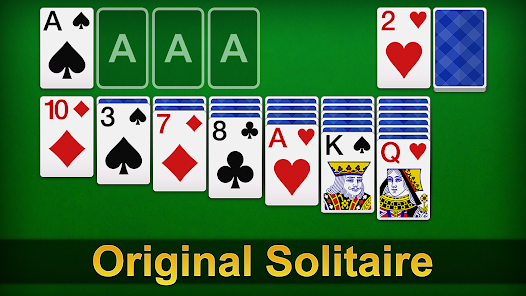
The game preserves everything that makes classic solitaire genuinely enjoyable. The seven-column tableau, the alternating-color movement rules, the foundation pile satisfaction of building Ace to King — all present and faithful to the version players have loved for decades. There are no rule variations or mechanical surprises, just a clean, reliable implementation of the game that needs no introduction.
What makes Original Classic Solitaire distinctly modern is its attention to the player's wellbeing alongside the gameplay. The time reminder feature is an honest acknowledgment that solitaire can be genuinely immersive — and that keeping track of session duration helps players engage with the game on their own terms without losing track of time unintentionally. It's a small feature with a big implication: this is a game designed with care for the person playing it, not just for maximum engagement at any cost.
The selection of beautiful backgrounds adds a personalization layer that makes each session feel like your own rather than a generic card table. It's a detail that matters more than it might seem — a game you can customize to your taste is one you're more likely to return to.
Key Details:
| Genre: | Card Game / Solitaire |
| Difficulty Level: | Easy to Medium |
| Average Play Time: | 10–20 minutes per session |
| Best For: | Mobile solitaire players who want a clean, faithful Klondike implementation with personalization options and mindful session management |
2. How to Play Original Classic Solitaire
Getting Started:
- Select your preferred background from the available options to personalize your playing environment.
- Cards are dealt into 7 tableau columns — face-down cards beneath, one face-up card on top of each.
- Move face-up cards onto other face-up tableau cards in descending order, alternating red and black suits.
- Uncover face-down cards by moving the face-up cards above them to valid destinations.
- Build the four foundation piles from Ace to King in suit to win each round.
Basic Controls:
- Tap to Select: Tap a face-up card to select it.
- Tap Destination: Tap a valid tableau position or foundation pile to move the selected card.
- Tap Stockpile: Draw from the stockpile when no valid tableau moves are available.
- Time Reminder: Use the built-in time reminder to monitor your session duration.
Objective: Sort all 52 cards into four foundation piles — one per suit, each ascending from Ace to King. Complete each round by successfully organizing all cards into their correct suits and ranks.
3. Original Classic Solitaire Features & Highlights
- ✓ Faithful Klondike solitaire rules — the classic game exactly as players know it, with no unnecessary variations
- ✓ Beautiful customizable backgrounds — choose from multiple visual themes to personalize your playing experience
- ✓ Time reminder feature — a mindful tool that helps players monitor session duration for healthy, balanced play
- ✓ Mobile-optimized design — purpose-built for on-the-go play on phones and tablets
- ✓ Mind-sharpening gameplay — the strategic card sequencing of solitaire provides gentle cognitive engagement every session
4. Original Classic Solitaire Tips & Strategies
Beginner Tips:
- Prioritize uncovering face-down cards. Every face-down card in the tableau is hidden potential — possible Aces, needed colors, and sequencing opportunities you can't see yet. Any move that reveals a face-down card is valuable. Work toward uncovering as many as possible early.
- Send Aces and Twos to foundations immediately. These cards serve no useful function in the tableau — they can't be placed under anything, and they're needed immediately on the foundations. Move them as soon as they become accessible.
- Avoid creating empty columns unless you have a King ready. Empty tableau columns are flexible staging areas — but only for Kings. Clearing a column without an immediate King to place in it creates wasted space.
Advanced Strategies:
- Think in sequences, not individual cards. Solitaire's most efficient moves involve relocating entire sequences of cards. When evaluating a move, consider whether moving the whole sequence from one column to another creates better positioning for the next three moves.
- Use the time reminder productively. If the time reminder alerts you mid-game, take it as a moment to evaluate your board holistically. Stepping back briefly often reveals moves or sequences you'd missed while focused on a specific area.
- Prefer longer sequences over shorter ones when both are valid. Moving a sequence of 5 cards to a new column is typically more productive than moving a sequence of 2 — it uncovers more face-down cards and creates more tactical flexibility.
What to Watch Out For:
- Neglecting the time reminder. The time reminder exists to support your wellbeing. If you find yourself dismissing it repeatedly without acknowledging the play duration, consider whether the session has become longer than intended.
- Tableau color lock. A column that accumulates cards of predominantly one color becomes harder to extend under the alternating-color rule. When you notice a column trending toward one color, actively look for opportunities to redirect its composition.
5. Original Classic Solitaire Game Elements Explained
The Classic Klondike Rules: Original Classic Solitaire implements the universally recognized Klondike solitaire format without modification. Seven tableau columns hold cards in stacked formations — from 1 card in the leftmost column to 7 in the rightmost, each with all but the top card face-down. Face-up tableau cards can be moved onto other face-up cards that are one rank higher and the opposite color (a red 8 on a black 9, for example). When a face-up card is moved, the face-down card beneath it flips face-up. Aces start foundation piles; each foundation builds from Ace to King in a single suit. The stockpile provides access to additional cards. This ruleset is the same one that has been played on Windows computers since 1990, making it immediately playable for virtually anyone with card game experience.
The Background Personalization System: Original Classic Solitaire offers a selection of beautiful backgrounds that players can choose before beginning a session. These backgrounds change the visual environment of the playing area — the color, texture, and atmosphere of the space in which the cards are displayed. While the gameplay is identical regardless of background choice, the aesthetic environment meaningfully affects how comfortable and enjoyable extended play sessions feel. Players who prefer calm, muted tones can choose accordingly; those who prefer warmer or more vibrant settings have options. The personalization system reflects a broader design philosophy: a game you feel ownership over, even at the cosmetic level, is one you're more likely to engage with meaningfully.
The Time Reminder System: The time reminder is Original Classic Solitaire's most thoughtfully distinctive feature. As a purpose-built mobile game designed for on-the-go sessions, it includes a tool that alerts players to their elapsed session duration — not to add pressure or interrupt gameplay, but to support the player's own intentions around how long they want to play. Solitaire's immersive quality is well-known — sessions that begin as "just a quick game" can extend considerably without the player realizing. The time reminder makes the passage of session time visible and conscious, allowing players to make deliberate choices about when to continue and when to step away. It's a feature designed for long-term player health rather than short-term engagement maximization.
6. Original Classic Solitaire Frequently Asked Questions
Q: What solitaire rules does Original Classic Solitaire use?
A: The game uses standard Klondike solitaire rules — seven tableau columns with alternating-color descending sequences, four foundation piles building from Ace to King in suit, and a stockpile for additional card access. These are the same rules as the classic computer solitaire most players know.
Q: How do I change the background?
A: Background selection is available at the start of a session or through the settings interface during play. Choose from the available options to find the visual environment that suits your preferences.
Q: What does the time reminder do?
A: The time reminder periodically alerts you to how long your current session has been running. It's a mindful feature to help you stay aware of your play duration and make conscious decisions about when to continue or step away — without any penalty or gameplay impact.
Q: Can I save a game in progress and resume it later?
A: Most mobile solitaire implementations save game state automatically when you exit, allowing you to resume where you left off. Check your specific version for save functionality — look for an auto-save indicator or manual save option.
Q: Is Original Classic Solitaire primarily for mobile or can it also be played on desktop?
A: The game is designed with mobile play in mind but runs in browser environments on both mobile and desktop. The tap-to-select controls translate to click-to-select on desktop without any loss of functionality.